admin
admin
My weekend routine typically involves taking care of my vintage gadgets, powering on my precious old Mac computers, checking that everything is working properly, exploring the software, fixing issues, and posting on Reddit to find answers from vintage Apple collectors. That’s what geeks do on their weekends.
This past weekend, while fixing my iMac G4, I accidentally discovered a trick on my iPhone Air ( it works on any iPhone) that I didn’t know existed. When you plug in your iPhone or iPad, it plays a charging sound. Sure, it works (honestly, I never really cared), but it’s boring. And, there’s a way to customise the charging sound and make it uniquely yours.
I chose a positive affirmation that makes me feel good every time I charge my iPhone, and you can do the same. If that sounds a bit boring, you can choose any phrase you like, or set a song from Apple Music and have some fun with it, but I strongly suggest avoiding curse words, since whatever you pick will be read out loud by your device.
Here’s how you can change your iPhone’s charging sound:
There are three ways to customise your iPhone’s charging sound: by playing a full song, a snippet of a song, or having Siri speak custom text whenever you plug in your phone. This works regardless of how you charge your iPhone. That said, Apple doesn’t allow you to replace the default charging sound; it only lets you play an additional sound after it. However, there’s a workaround to mute the original sound so you hear only your custom audio.
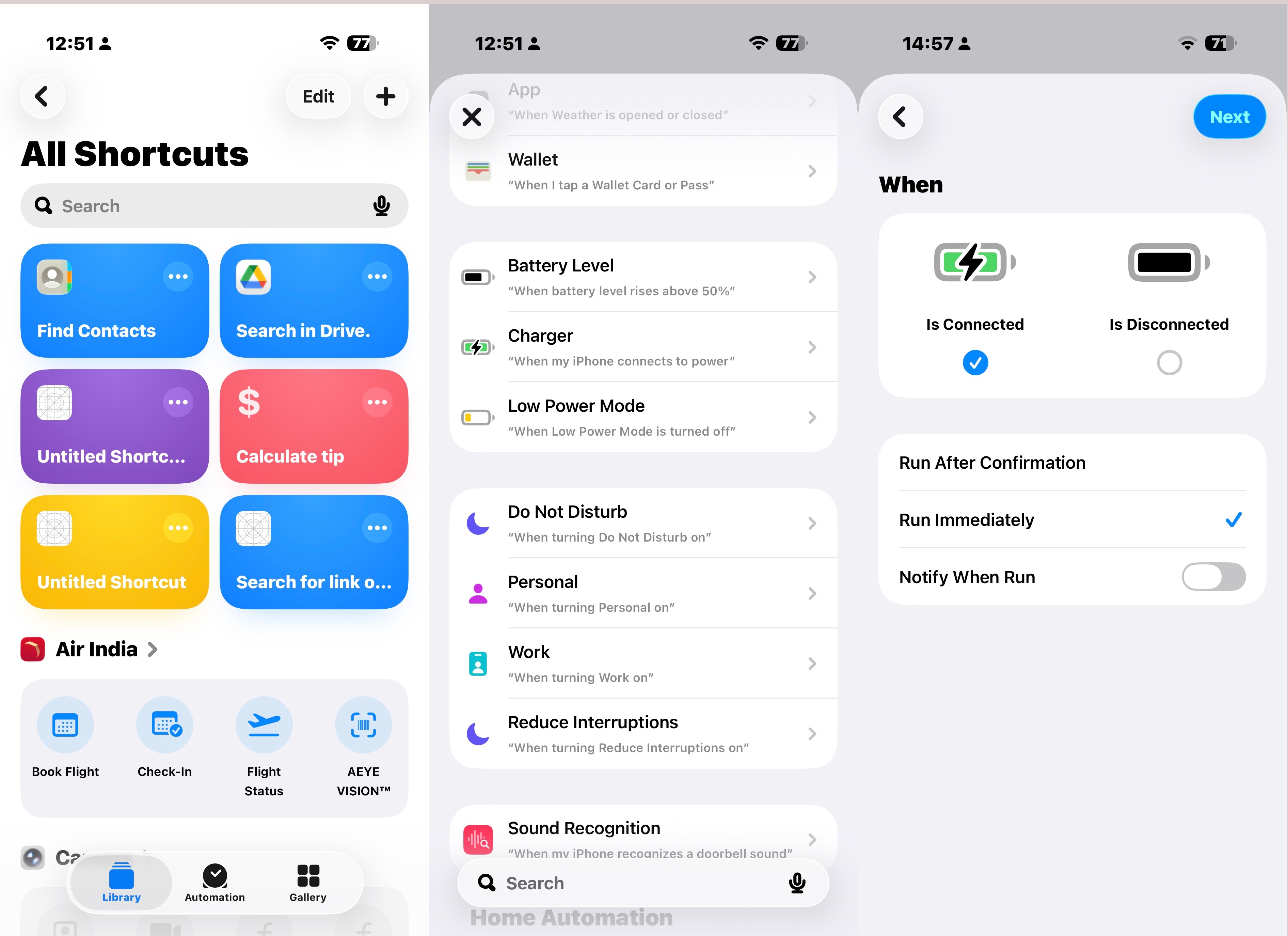 Just make sure the Shortcuts app is up and running on your iPhone. If not download Shortcuts from the App Store. (Screenshot taken on the iPhone Air)
To set this up, you will need Apple’s built-in Shortcuts app, which supports automations like changing the charging sound. If you have deleted the app, you can reinstall it from the App Store.
Assuming you have the Shortcuts app installed on the iPhone (you can try the same steps on the iPad as well), follow these steps:
1.Open the Shortcuts app on your iPhone
2.Select the Automation tab and tap New Automation.
3.Scroll down and tap Charger.
Story continues below this ad
4.Tap the Is Connected. If you also want a custom sound to play when you unplug your phone, select Is Disconnected as well.
5.Select Run Immediately to run the automation without approval.
6.Tap Next in the top-right corner of the screen.
How to change your iPhone’s charging sound to a song from Apple Music
I will start by showing you how to change your iPhone’s charging sound to a song from Apple Music. This method works if you have downloaded a song from Apple Music and want your iPhone to play the whole track every time you plug it in.
Follow these steps:
1. Tap New Blank Automation and select Play Music.
2. Tap the greyed-out Music text, then choose a song from your Apple Music library. Once selected, the Library pop-up will close, and the song title will appear in place of the grey text.
3. Tap the arrow next to the song title and set Shuffle to Off and Repeat to None.
4. Tap Done in the top-right corner of the screen.
Story continues below this ad
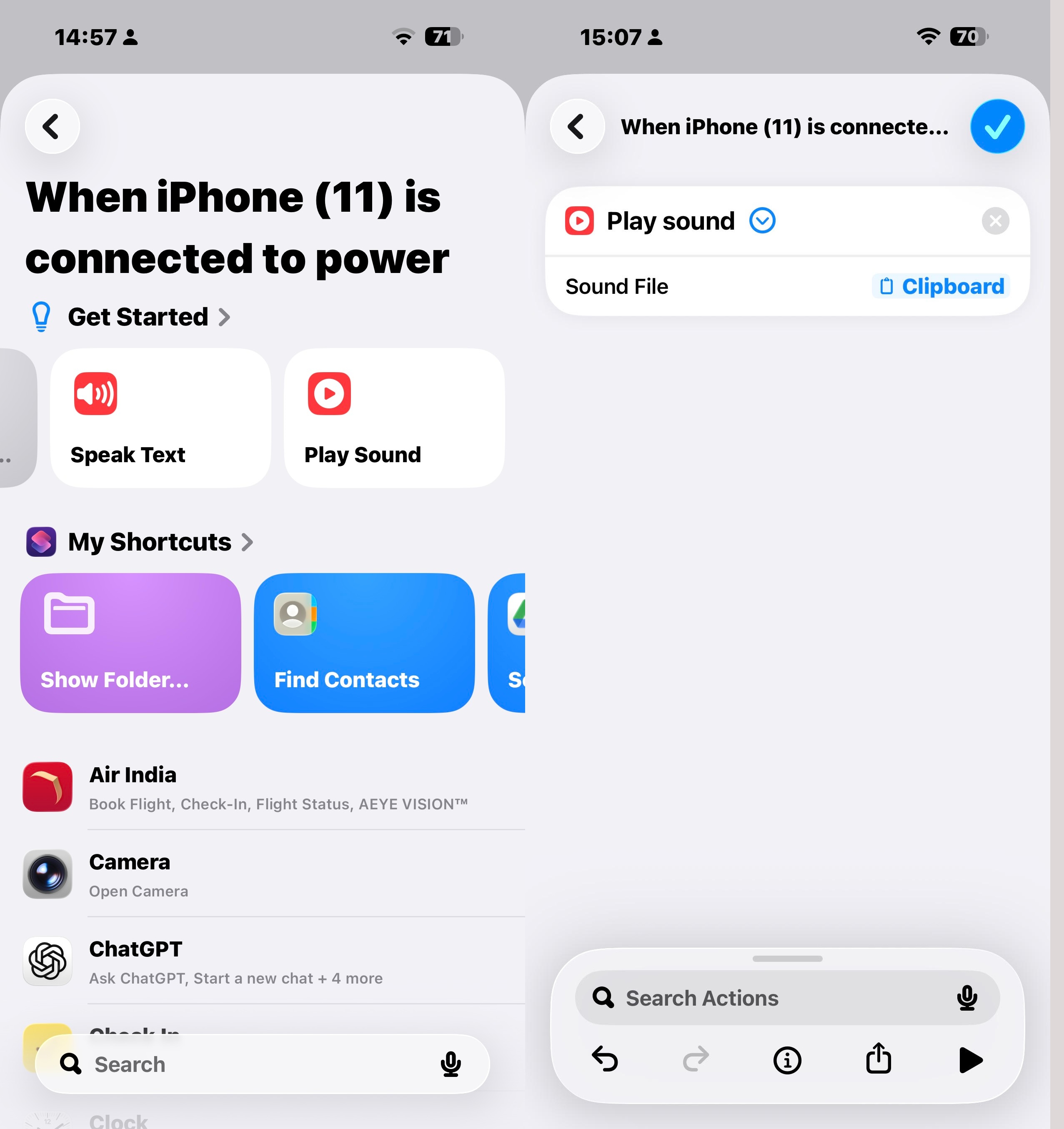 Once the sound is ready, you will need to create an automation to set your custom charging sound. (Screenshot taken on the iPhone Air)
How to change your iPhone’s charging sound to a Short Audio Clip
It is also possible to use a short audio clip if you don’t want your iPhone’s charging sound to be a full song. However, please note that the clip can be one to three seconds long, but it must be in a format supported by Apple, such as MP3, AIFF, or WAV.
I have noticed that you may need to convert the file from MP4 to MP3 or another compatible format before using it as your iPhone’s charging sound. Once the sound is ready, you will need to create an automation to set your custom charging sound.
All you need to do is copy the audio clip to the clipboard. Open it in the Files app, tap Share in the bottom-left corner of the screen, and select Copy. The next step is to open the Shortcuts app and create an automation based on connecting or disconnecting the charger, as explained earlier.
Now, follow the steps below:
1. Select the Play Sound action.
2. Tap the arrow next to Play Soundand select Choose Variableand select Clipboard from the menu.
3. Tap Done in the top-right corner of the screen.
Story continues below this ad
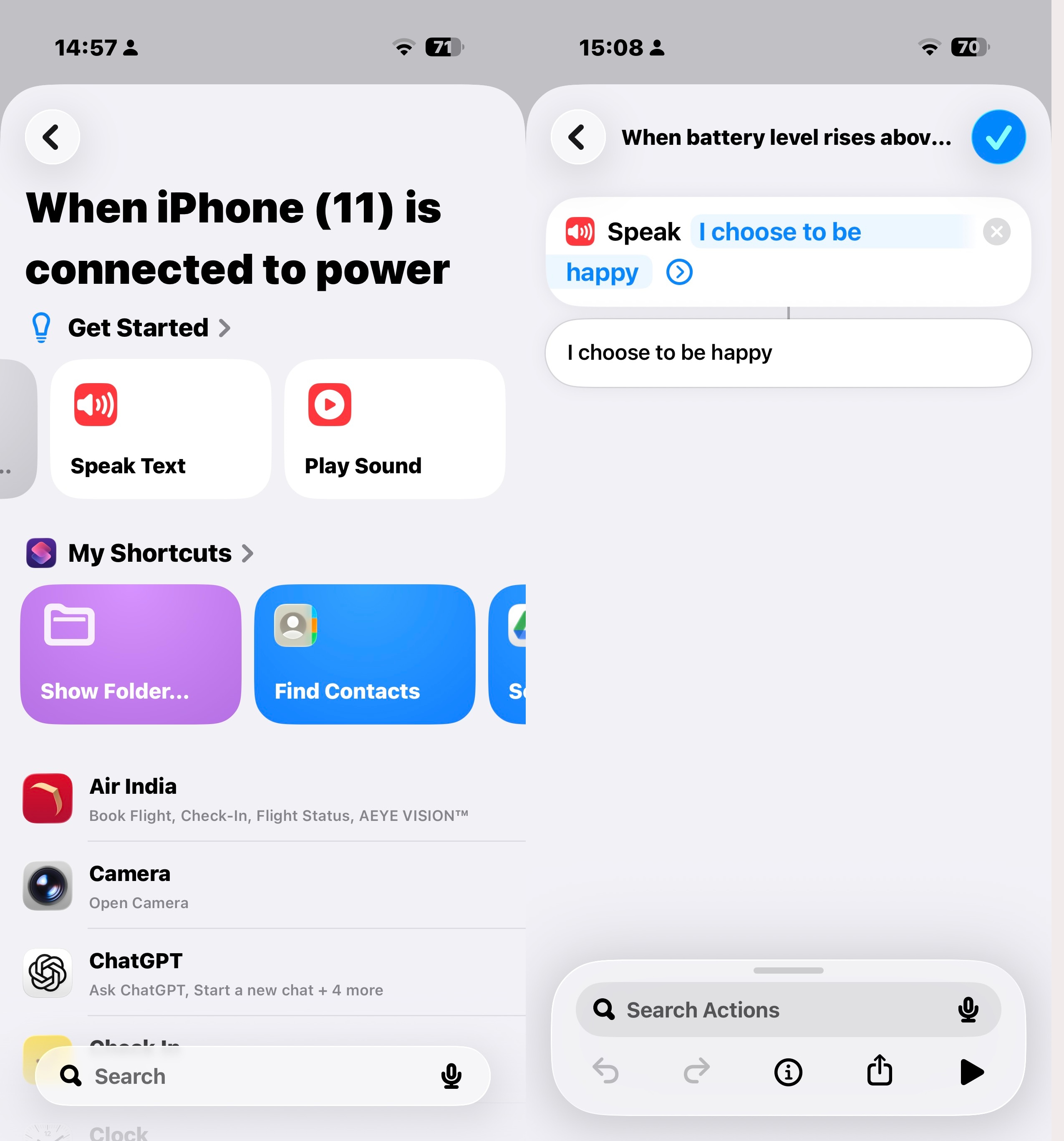 You can also select “New Blank Automation” and search and add “Speak Text” from there. (Screenshot taken on the iPhone Air)
How to change your iPhone’s charging sound to Siri-spoken text
If you don’t want to set a specific audio clip for your iPhone’s charging sound, you can ask Siri to say something instead and use it as spoken text.
Follow these steps below to create the automation:
1. Search for Speak Text in the Shortcuts search bar and add it to the actions list.
2. In the Speak Text action, tap Text and type what you want Siri to say when you plug in or unplug your phone. I went a morning affirmation and used the text as “I choose to be happy” but you can use whatever you want.
3. The next step is to adjust Siri’s pitch, speed, language, and voice by tapping (I set it to English (India) the arrow to access more options. And when you are done entering the word or phrase, tap Done in the top-right corner.
Story continues below this ad
For a tip: Don’t get carried away with curse words, as your phone will say them out loud for everyone to hear, even if it’s on Silent or Do Not Disturb mode.
Can I mute iPhone’s default charging sound?
I found a way to mute the iPhone’s default charging sound. To silence the default sound, you can keep your iPhone in Silent Mode, which limits it to vibration only. If you want to disable the vibration as well, go to Settings > Sounds & Haptics and turn off System Haptics.
That’s how you can make your iPhone more personal. For more tips like this, follow me and keep coming back to indianexpress.com.